
What Should You Do Now That PrestaShop 1.6 Is No Longer Maintained?
For many years, PrestaShop 1.6 was considered a reliable, fast and relatively straightforward e-commerce solution. Many online stores still use it today, often because they rely on a custom theme, business-specific modules or a setup that perfectly matches their day-to-day operations.
However, PrestaShop 1.6 has not been officially maintained since 30 June 2019. Since 1 July 2019, any remaining maintenance work has depended exclusively on community initiatives and is no longer handled by PrestaShop itself. PrestaShop officially confirmed the end of support.
Continuing to operate an official PrestaShop 1.6 installation without a clear upgrade strategy therefore represents an increasing risk.
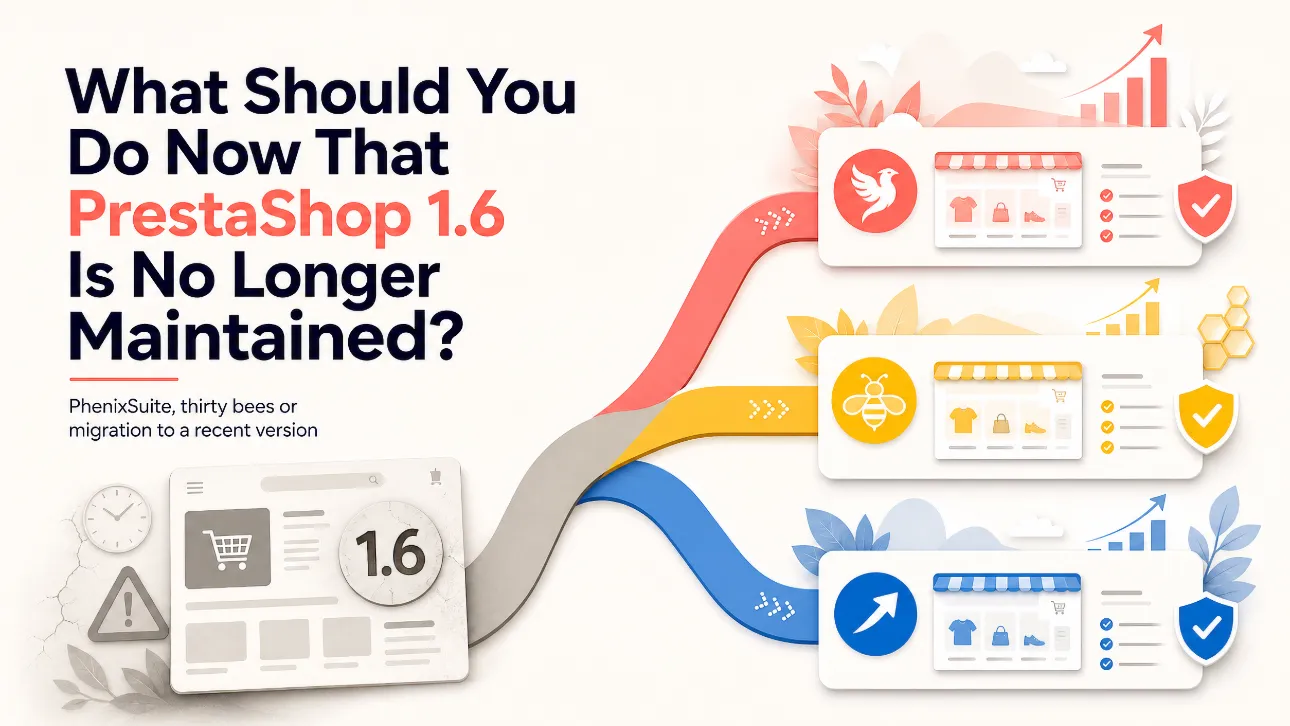
Store owners currently have three main options:
- upgrade their store to PhenixSuite;
- migrate to thirty bees;
- migrate to a more recent version of PrestaShop.
Each option meets different needs. The right decision depends on the complexity of the store, its budget, modules, custom developments and medium-term objectives.
Why Should You Stop Using an Unmodified PrestaShop 1.6 Store?
An online store may appear to work correctly even though its technical foundations have become obsolete. The absence of visible problems does not mean the platform remains secure or sustainable.
No More Official Security Updates
PrestaShop 1.6 no longer receives official security, compatibility or stability updates. If a vulnerability is discovered in this version’s core, there is no guarantee that an official patch will be released.
This is particularly important for an online store, which handles information such as:
- customer accounts;
- personal addresses;
- orders and invoices;
- connections to payment providers;
- commercially sensitive information.
The ageing core is only part of the problem. PrestaShop 1.6 also depends on old PHP, JavaScript and Smarty components.
Dependence on Outdated PHP Versions
An official PrestaShop 1.6 installation generally requires an old version of PHP. PHP 7.4 has not been maintained since November 2022, while PHP 8.0 and PHP 8.1 have also reached end of life.
The PHP project explicitly recommends upgrading from unsupported branches because they may contain security vulnerabilities and bugs that are only fixed in newer releases. See the official list of unsupported PHP versions.
This dependence creates several problems:
- hosting providers are progressively removing older PHP versions;
- keeping an outdated version may require a special hosting package;
- updating the operating system and server components becomes more difficult;
- new modules and third-party services may no longer be compatible;
- exposure to security vulnerabilities increases.
Some hosting providers maintain patched versions of older PHP branches. However, this does not resolve the obsolescence of the PrestaShop core and its bundled dependencies.
Modules That No Longer Receive Updates
Payment providers, carriers, marketplaces and marketing services regularly update their APIs. The corresponding PrestaShop 1.6 modules may no longer receive the necessary changes.
A store can therefore encounter difficulties with:
- new payment authentication protocols;
- changes to carrier APIs;
- regulatory requirements;
- consent and advertising tracking tools;
- marketplace product feeds;
- ERP, CRM and point-of-sale integrations.
This risk does not only concern newly installed modules. An old module may continue working for years and then suddenly stop communicating with an external service.
Increasing Maintenance Costs
As a technology becomes older, finding developers willing and able to maintain it becomes more difficult.
Every intervention requires additional care because a local correction can have unexpected effects on a core or module that has not evolved for several years.
The store gradually becomes technically frozen:
- PHP cannot be upgraded without extensive adjustments;
- replacing a critical module becomes difficult;
- any change to the theme creates uncertainty;
- modifications made directly to the core accumulate;
- no reliable update procedure is available.
The cost does not necessarily appear as one large project. It is often spread across a succession of small but increasingly urgent technical interventions.
First Option: Upgrade the Store to PhenixSuite
PhenixSuite is a community-driven continuation based on the PrestaShop 1.6 codebase. Its objective is to preserve the architecture and back office familiar to PrestaShop 1.6 users while providing fixes, new features and compatibility with modern PHP versions.
The project currently advertises compatibility from PHP 5.6 to PHP 8.4 and regularly updates several bundled libraries. The official website presents PhenixSuite’s versions and improvements.
Advantages of PhenixSuite
The main advantage of PhenixSuite is continuity. Store owners retain an environment very similar to their current one:
- a familiar back office;
- an architecture inherited from PrestaShop 1.6;
- an existing theme that is often easier to preserve;
- modules that can frequently be reused;
- lower adaptation costs for custom developments;
- a lighter transition than migrating to PrestaShop 8 or 9.
PhenixSuite can therefore be an attractive option when an existing PrestaShop 1.6 store works well, includes numerous custom developments and does not require a complete redesign.
The project also improves the original platform with bug fixes, optimisations and features that were not available in the final official PrestaShop 1.6 release.
Constraints of PhenixSuite
PhenixSuite is not an official version published or supported by PrestaShop. It is an independent project supported by a smaller team and community.
Several points must therefore be considered:
- its module catalogue is smaller than the current PrestaShop ecosystem;
- not every module developer officially tests products on PhenixSuite;
- some old modules remain incompatible with PHP 8 even if the core is compatible;
- modifications made directly to the PrestaShop core can complicate the upgrade;
- fewer agencies and developers specialise in the platform.
The project itself recommends testing the upgrade on a copy of the store, particularly when core files have been modified or overrides are present.
When Should You Choose PhenixSuite?
PhenixSuite may be suitable if:
- the existing store is stable and profitable;
- the current theme and modules still meet the business requirements;
- numerous custom developments depend on the PrestaShop 1.6 architecture;
- the budget does not allow for a complete redesign;
- the objective is to extend the store’s lifespan without radically changing working habits;
- a service provider capable of maintaining PhenixSuite is available.
The transition should nevertheless be treated as a genuine platform change, not as the improvised installation of a simple patch.
Second Option: Migrate to thirty bees
thirty bees is an open-source e-commerce platform originally forked from PrestaShop 1.6.1.11. It has since followed its own development path, focusing on stability, reliability and the preservation of a relatively lightweight platform.
The project states that it remains compatible with most modules created for PrestaShop 1.6. The official repository presents the direction and activity of thirty bees.
Advantages of thirty bees
Like PhenixSuite, thirty bees provides an environment that remains close to PrestaShop 1.6. This similarity can reduce the transition cost compared with migrating to a modern PrestaShop version.
Its main advantages include:
- a free and open-source platform with its own development project;
- an architecture familiar to PrestaShop 1.6 developers;
- broad compatibility with older modules;
- a lightweight back office;
- a migration tool designed for PrestaShop 1.6 stores;
- update and rollback mechanisms;
- a strong focus on performance and stability.
Official migration documentation for PrestaShop 1.6 stores is available.
Constraints of thirty bees
thirty bees is now a separate platform. As time passes, its ecosystem and the PrestaShop ecosystem continue to diverge.
This independence creates several constraints:
- compatibility with a PrestaShop 1.6 module is not automatically guaranteed;
- new modules developed for PrestaShop 8 or 9 generally cannot be used;
- some payment providers and carriers do not offer official modules;
- the choice of themes and extensions is more limited;
- finding a developer with specific thirty bees experience may be necessary;
- custom development completed for thirty bees may need to be adapted again if the store later returns to PrestaShop.
A maintained core is important, but the viability of an online store also depends on its wider ecosystem. Payment, shipping, invoicing and business integration requirements should therefore be verified before making a decision.
When Should You Choose thirty bees?
thirty bees may be appropriate if:
- the priority is to retain a lightweight platform derived from PrestaShop 1.6;
- all critical modules have been tested on thirty bees;
- functional requirements are relatively stable;
- the merchant values stability over access to the latest PrestaShop module catalogue;
- suitable technical expertise is available;
- independence from the official PrestaShop ecosystem is an accepted choice.
This option is generally better suited to a store with well-defined requirements than to a project planning to add numerous new integrations in the near future.
Third Option: Migrate to a Recent Version of PrestaShop
The third option is to rejoin the modern PrestaShop project. In 2026, this means preparing the store for a version that still receives official maintenance, generally PrestaShop 8 or 9 depending on the project requirements and module compatibility.
PrestaShop 9 requires at least PHP 8.1 and supports modern PHP versions. Its architecture notably relies on Symfony 6.4. The official documentation provides its technical requirements.
Advantages of a Recent PrestaShop Version
This option provides the best continuity with the official ecosystem:
- security and maintenance updates;
- compatibility with modern PHP versions;
- access to recently developed modules;
- better support from payment providers and carriers;
- a larger community and network of service providers;
- a more modern architecture for new developments;
- stronger long-term prospects.
It is generally the most coherent solution for a store planning a redesign, international expansion, new business integrations or significant growth.
It also avoids investing in a derived platform if the long-term objective is ultimately to return to the official PrestaShop ecosystem.
Constraints of Migrating to a Recent PrestaShop Version
Moving from PrestaShop 1.6 to PrestaShop 8 or 9 is not a minor update. Several major technical generations separate these versions.
In many cases, the project must be treated as a migration or complete redesign:
- the PrestaShop 1.6 theme must be replaced or entirely adapted;
- some modules must be purchased again;
- custom modules may need to be rewritten;
- each override must be analysed individually;
- data must be transferred and carefully checked;
- URLs and redirects must be prepared to protect search engine rankings;
- ordering, payment, shipping and refund processes must be tested again.
The modern architecture, which makes greater use of Symfony and Composer, also requires different skills from those traditionally used for PrestaShop 1.6 development.
The initial cost is therefore generally higher. In return, the migration reduces technical debt and places the store on a more sustainable path.
When Should You Choose a Recent PrestaShop Version?
This option should be prioritised if:
- the store already needs a visual redesign;
- several important modules are no longer maintained;
- new integrations are planned;
- the business wants to invest in a platform for the coming years;
- the store processes a significant number of orders;
- compliance, security and maintainability are priorities;
- the merchant wants access to the current PrestaShop ecosystem.
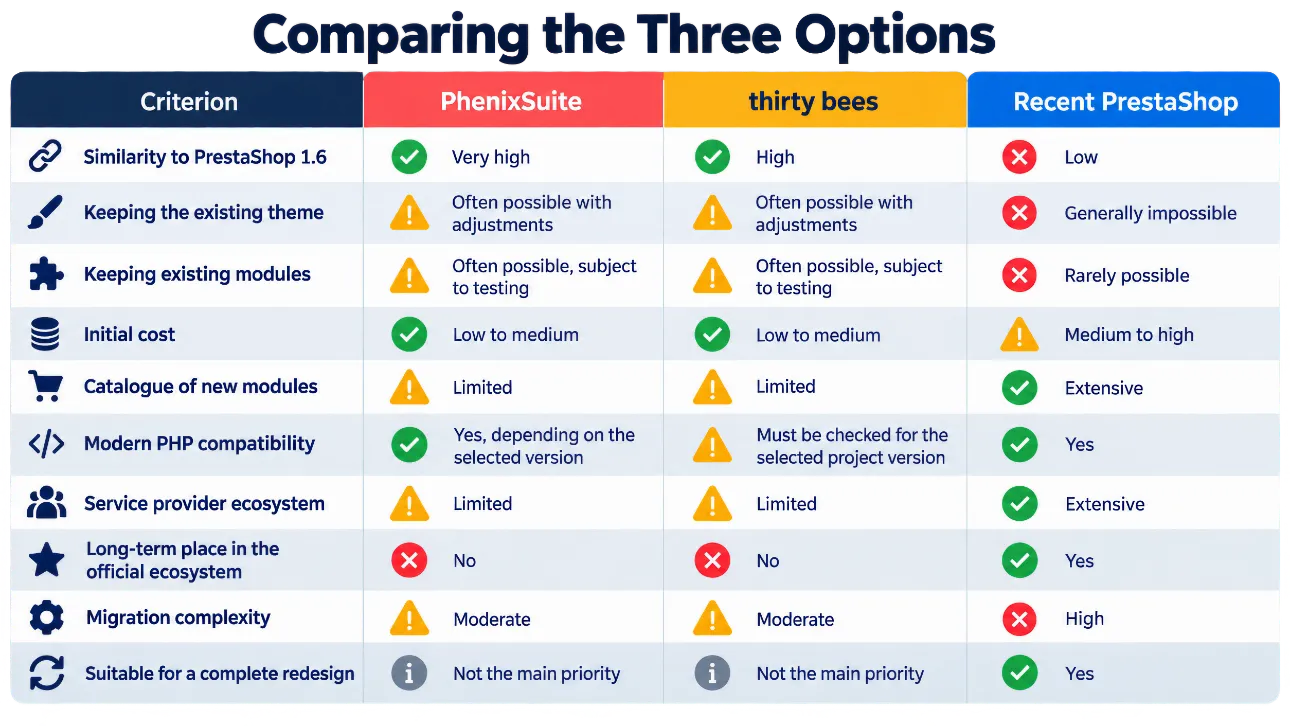
The decision should not be based exclusively on the immediate cost. The total cost of each option should be compared over several years.
Before choosing a solution, it is advisable to carry out an audit covering the following areas.
1. Module Inventory
Identify essential modules, modules that are no longer used and modules that communicate with external services.
2. Theme Analysis
Check customisations, modified files and any dependencies on outdated JavaScript libraries.
3. Custom Development Review
Identify overrides, core modifications, scheduled tasks, external connectors and custom scripts.
4. Hosting Audit
Check PHP, MySQL or MariaDB versions, the HTTPS certificate, backup procedures and restoration options.
5. Future Business Requirements
Does the business plan to redesign the store, replace its ERP, introduce a new payment solution, connect to a marketplace or expand internationally?
6. Commercial Risk Assessment
What would several hours or days of store downtime cost the business?
A Migration Must Always Be Tested on a Copy
Whatever option is selected, the production store should never be transformed directly.
The correct process is to:
- create a complete backup of the files and database;
- produce an isolated clone of the store;
- perform the upgrade or migration on that clone;
- adapt the theme and modules;
- test customer accounts, prices, taxes and promotions;
- place orders using every payment method;
- test carriers, emails, invoices, credit notes and refunds;
- check search engine optimisation and redirects;
- prepare a rollback procedure;
- synchronise recent data before the production launch.
A backup is only truly useful if its restoration has been tested.
Conclusion: Remaining on Official PrestaShop 1.6 Is No Longer a Reasonable Strategy
A PrestaShop 1.6 store may still operate, but it should no longer remain frozen on the final official release. The obsolescence of PHP, bundled libraries and third-party modules progressively increases the risks of security vulnerabilities, failures and incompatibilities.
Each of the three alternatives has its own logic:
- PhenixSuite offers the most natural transition for extending the life of an existing PrestaShop 1.6 store while limiting changes.
- thirty bees provides an independent, lightweight platform with historical compatibility with the PrestaShop 1.6 ecosystem.
- A recent version of PrestaShop requires a larger investment but offers the broadest ecosystem and the strongest long-term prospects.
For a small, stable and heavily customised store whose requirements are unlikely to change significantly, PhenixSuite or thirty bees may represent a pragmatic solution.
For a strategically important store that is expected to grow or connect to new services, migrating to a recent version of PrestaShop will generally be the most sustainable investment.
The greatest risk is not choosing a different solution from another merchant. The real risk is making no decision and waiting until a failure, security vulnerability or discontinued critical module forces an emergency migration.
Do You Need Help Upgrading Your Store?
Choosing between PhenixSuite, thirty bees and a recent version of PrestaShop requires a detailed analysis of your store. The right choice depends on its history, modules, theme, custom developments and commercial objectives.
Mediacom87 provides maintenance, security and migration services for e-commerce websites running on PrestaShop, thirty bees or PhenixSuite.
Our support services can include:
- a technical audit of your store and hosting environment;
- an analysis of modules, themes, overrides and custom developments;
- the identification of risks related to obsolete components;
- a recommendation based on your business and technical requirements;
- an upgrade to PhenixSuite or a migration to thirty bees;
- a migration to a recent version of PrestaShop;
- the adaptation or development of custom modules;
- the migration of the existing design and custom features;
- store security, optimisation and maintenance;
- functional testing before production launch;
- backup and rollback planning;
- post-migration technical support.
Every project is assessed individually to protect its data, essential functionality, search engine rankings and commercial continuity.
Do not wait until PrestaShop 1.6 obsolescence forces you into an emergency migration. Mediacom87 can help you prepare a realistic roadmap that matches your budget and the requirements of your online store.
Is your website running on PrestaShop, thirty bees or PhenixSuite? Mediacom87 can audit, maintain or migrate your store and help you prepare the next stage of your e-commerce business.

Comments